Instagram
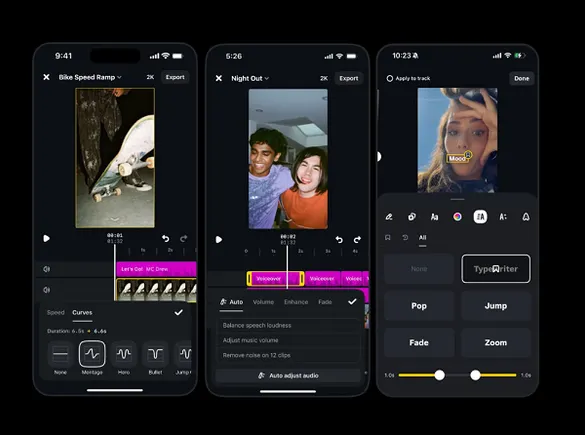
Meta has rolled out a new batch of features for Edits, its video editing app tied to Instagram. Creators can now apply speed curves to vary playback speed within a clip, choosing from presets or building their own. An auto-adjust tool balances audio levels across video elements, and new controls let users set how long text animations stay on screen and how fast they loop.
Edits also now lets users pick which topics they want to see more or less of in its Inspiration tab, similar to Meta's Your Algorithm tool for feeds. The update continues Meta's near-biweekly release cadence for the app, which has also recently arrived on desktop, giving editors a larger workspace.
For sports social teams, speed curves are a natural fit for highlight Reels: slow down the moment a shot hits the net or a tackle lands, then snap back to full speed. Auto audio balancing helps when mixing crowd noise, commentary and music, while text timing controls make score overlays and sponsor tags cleaner. Tuning the Inspiration tab toward sports topics can surface fresh format ideas.